

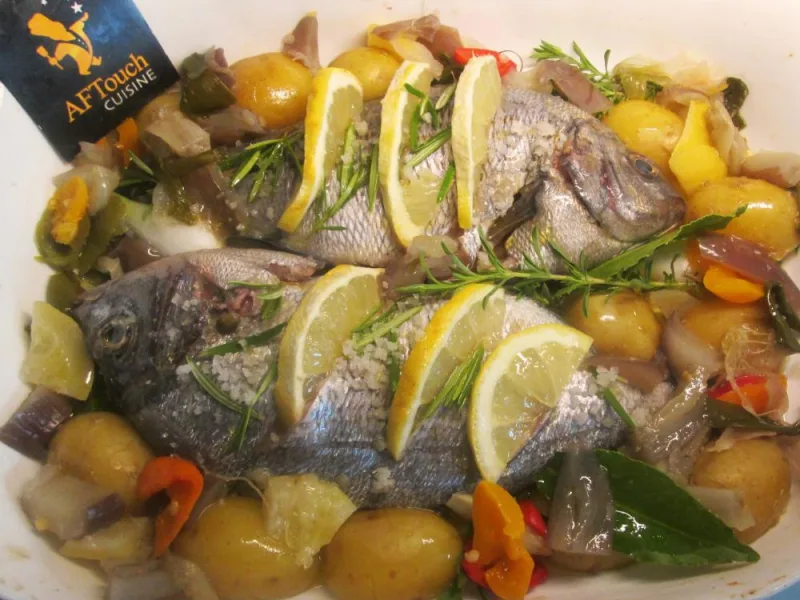
Recipe: Roasted Line-Caught Sea Bream with Market Garden Vegetables
By
chef patrick Asfaux4.2/5
(13reviews)
· 🍳 28 made it
Be the first to rate
Thanks for your rating!
Add AFTouch to your home screen
A shortcut on your phone for one-tap access.
How to do it on iPhone :
1. In Safari, tap the Share button (square with an up arrow, at the bottom of the screen).
2. Scroll down and tap "Add to Home Screen".
3. Tap Add at the top right.
4 Beautiful small line-caught sea breams of approximately 14 oz (400g) each, scaled and gutted
12 small slices of untreated lemon (lime)
16 small new potatoes from Ré, just blanched
Onion, bell pepper, zucchini and small tomatoes, just thinly sliced
2 cloves of garlic, just crushed
Lemon thyme
Well-ripened olive oil
Coarse sea salt
Step-by-step directions
1 In a large ovenproof dish, arrange your sea breams in a staggered pattern, salt their insides lightly, then make 3 slits in each one to insert your lemon slices.
2 Arrange all your vegetables around them + the small potatoes, salt.
3 Drizzle generously with olive oil and preheat your oven to 410°F (210°C) (gas mark 7).
4 Place the dish in the middle of the oven, then after 20 minutes turn off the oven and pour 1/2 glass of water into the cooking dish, let it rest like this for 10 minutes.
You enjoyed this recipe of roasted line-caught sea bream with market garden vegetables?
Discover other recipes of sea bream, or browse the fishes category. This dish pairs well with Cassis.
Roasted Line-Caught Sea Bream with Market Garden Vegetables
min
--:--
1 / ?
🎉🥣🎉
Congratulations, Chef!
You have completed the recipe! We hope it turned out delicious.
📷
Show us your creation!
Take a beautiful photo of your dish and share it with our community. Your photo could illustrate this recipe on the site!
💬
Your opinion matters!
Did you adapt the recipe? Have a tip to share? We are eager to hear your feedback and experiences. Your comments help other cooks!
Add AFTouch to your home screen
A shortcut on your phone for one-tap access.
How to do it on iPhone :
1. In Safari, tap the Share button (square with an up arrow, at the bottom of the screen).
2. Scroll down and tap "Add to Home Screen".
3. Tap Add at the top right.
🛒
0
🛒 Shopping List
?
Culinary assistant
×
Hello! I'm the Chef's little helper. What would you like to cook today? 😊
Help other cooks
Share a tip, your adaptation, your result. Every comment counts.